Bulk editing installations

Only users with an "Administrator" role in a project can access these tools.

The instructions below are for bulk editing traps.  The same method can be used to bulk edit stations, just replace the word "trap" with "bait station" or "monitoring station" as needed. 

Bulk editing operations include:

    Add / remove tags

      Line

        Assign / unassign members to traps & stations

          Retired

            Delete traps & stations

              Trap sensor provider

                Change trap & station details

                  Send Meta Data about this trap to your sensor provider?

                    Date installed

                      Trap notes

                        Installed by

                          Move selected traps & stations to another project

                            Type

                              Remove sensors from traps

                                Sub type

                                  Retire traps
                                   

                                    Modify members' sensor notifications subscriptions
                                    • Add / remove tags
                                    • Assign / unassign members to traps & stations
                                    • Delete traps & stations
                                    • Change trap & station details
                                    • Date installed
                                    • Installed by
                                    • Type
                                    • Sub type
                                    • Line
                                    • Retired
                                    • Trap sensor provider
                                    • Send Meta Data about this trap to your sensor provider?
                                    • Trap notes
                                    • Move selected traps & stations to another project
                                    • Remove sensors from traps
                                    • Retire traps
                                    • Modify members' sensor notifications subscriptions
                                    To bulk edit traps
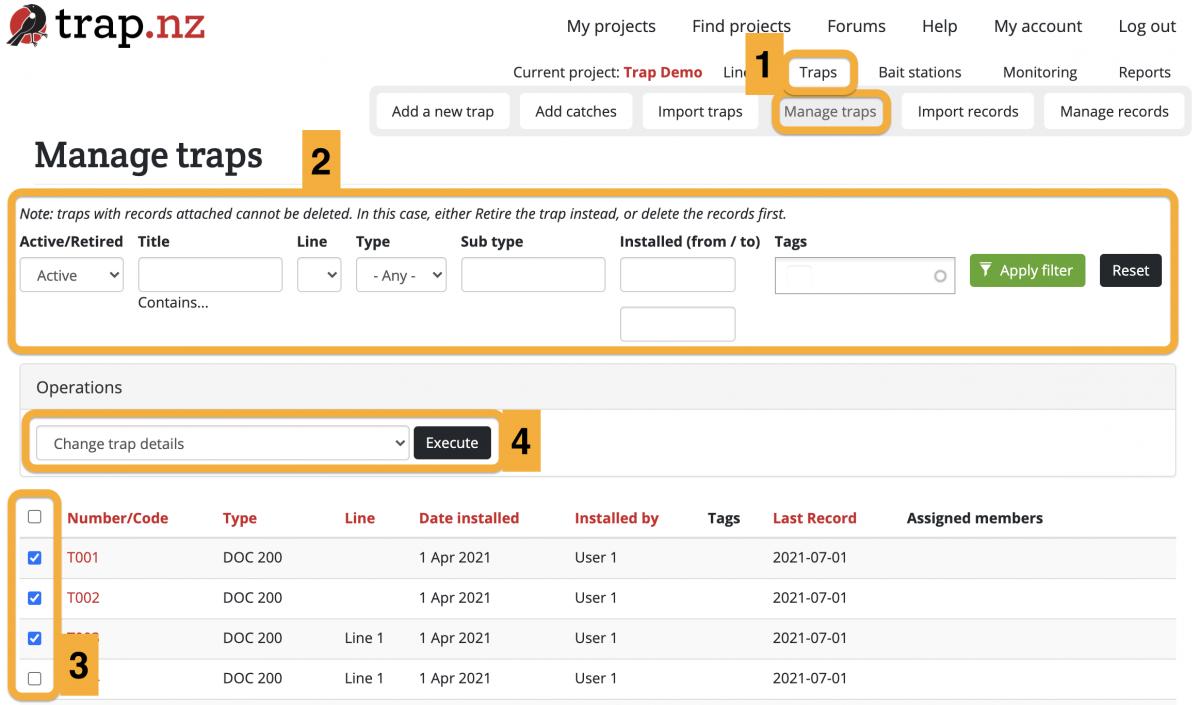
                                    1. Go to the Manage Traps section of your project (If you have more than one project, check that you're in the right one). You can get there via Traps > Manage Traps in your project menu.
                                    2. (Optional) If you have a lot of traps, you can search for the particular traps that you want to edit using the filter bar. Click the green "Apply filter" button to show the filtered traps.
                                    3. Select the checkboxes of the traps you want to edit.
                                    4. Choose an operation from the Operations dropdown menu, then click the "Execute" button.
                                    5. From here you will be guided to edit the selected traps in whatever way you have selected.
                                    6. Check your edits and click the green "Confirm" button to save your changes.